
Overview
Before LSAs synchronize, OSPF routers must become neighbors and form an adjacency. This guide covers adjacency requirements, the neighbor state machine, DR/BDR behavior on multi-access segments, OSPF cost, inter-area route codes, and stub-area awareness.
For link-state fundamentals and single-area configuration syntax, start with OSPF Fundamentals. For IPv6 OSPF, see OSPFv3 for IPv6.
Neighbor adjacency requirements
Hello parameters must match for adjacency to progress:
- Hello and dead intervals
- Area ID
- Subnet and mask on the link
- Stub area flag (must match on both sides)
- Authentication type and key (if configured)
Bi-directional communication is confirmed when a router sees its own Router ID in a neighbor's Hello.
Process ID does not need to match — it is locally significant. Timer, area, and subnet mismatches are the usual lab traps.
Will an OSPF Neighbor Adjacency Form?
Walk the checklist top to bottom. Every step must pass before LSDB exchange can reach FULL.
Is OSPF enabled on both interfaces?
Are both interfaces up/up?
Are they in the same IP subnet with matching mask?
Is the Area ID the same?
Do Hello and Dead timers match?
Does the area type / stub flag match?
Does authentication match, if configured?
Is the interface not passive?
Is IP protocol 89 and OSPF multicast allowed?
Are Router IDs unique on the segment?
For FULL adjacency: no MTU mismatch (ExStart/Exchange stall)?
All checks pass and LSDB exchange completes. On broadcast multi-access segments, DROTHERs still form FULL with the DR and BDR.
On broadcast multi-access networks, DROTHER-to-DROTHER adjacencies often stop at 2-WAY. That is expected — not every pair needs FULL.
Common failure points
Area mismatch
Hellos dropped — different area IDs.
Timer mismatch
Hello/dead intervals must match exactly.
Passive interface
No Hellos sent — adjacency cannot start.
Stub flag mismatch
Stub area flag must match on both sides.
Duplicate Router ID
Conflicting identity breaks adjacency logic.
MTU mismatch
Stuck in ExStart/Exchange — compare interface MTU.
Fast troubleshooting
| Problem | Likely cause | First command |
|---|---|---|
| No neighbor | Area, timer, subnet, or passive mismatch | show ip ospf interface |
| Stuck INIT | One-way Hellos — ACLs, multicast, or neighbor RID issue | show ip ospf neighbor |
| Stuck 2-WAY | Normal for DROTHERs on MA, or DR election issue | show ip ospf neighbor |
| Stuck EXSTART/EXCHANGE | MTU mismatch or Router ID conflict | show ip ospf interface |
| No OSPF routes | Network/interface not enabled or passive interface | show ip protocols · show ip route ospf |
Neighbor state machine
| State | Meaning |
|---|---|
| Down | No Hello heard from neighbor |
| Init | Hello received; not yet bidirectional |
| 2-Way | Bidirectional Hellos; election complete on MA segments |
| ExStart | Master/slave negotiation for DBD exchange |
| Exchange | DBD packets describe LSDB summaries |
| Loading | LSR/LSU exchange for missing LSAs |
| Full | LSDB synchronized — adjacency complete |
FULL means the databases are synchronized and SPF can trust the topology. On broadcast multi-access networks, DROTHER-to-DROTHER pairs often remain at 2-WAY — that is normal.
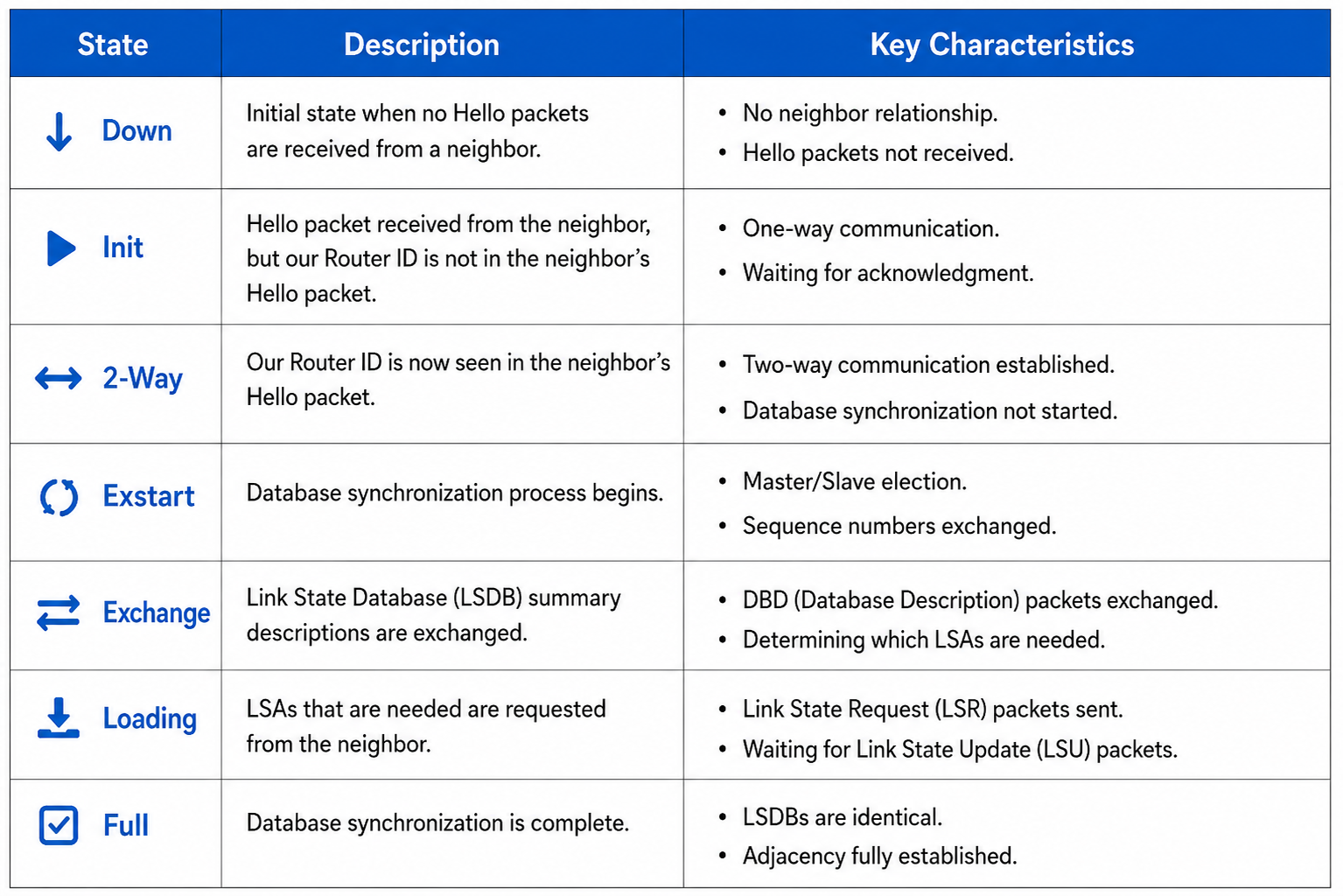
Neighbor state machine — Down through Full.
From study charts · jdepew88 CCNA notes
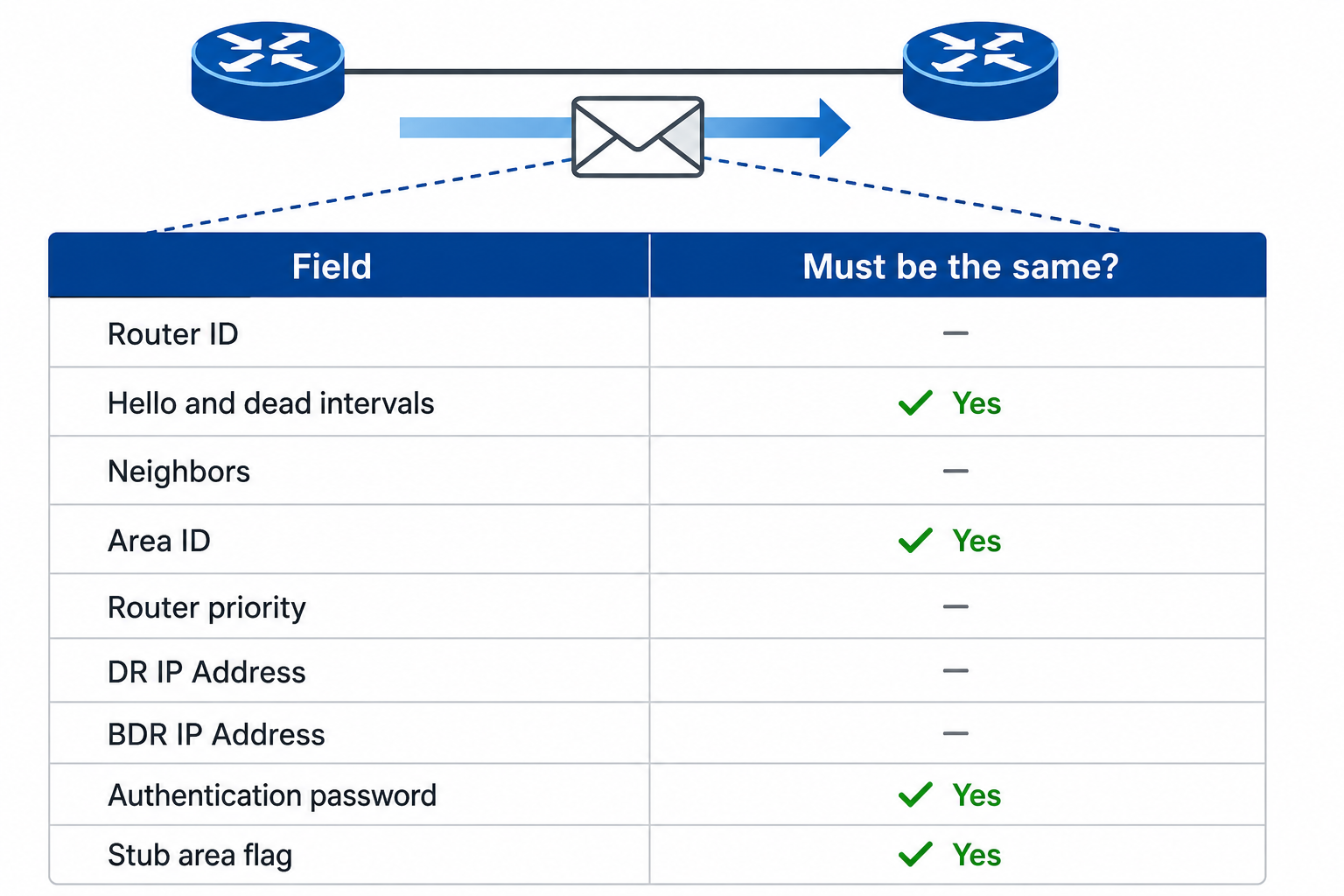
Key fields in show ip ospf neighbor output.
From study charts · jdepew88 CCNA notes
DR/BDR and DROTHER behavior
On broadcast (Ethernet) and NBMA networks, OSPF elects a Designated Router (DR) and Backup DR (BDR) to reduce LSA flooding.
- DROTHER routers form FULL adjacency with the DR and BDR only
- DROTHERs stay at 2-WAY with each other — not a fault
- Point-to-point links (serial HDLC/PPP): no DR/BDR election
- Point-to-multipoint behaves like a collection of point-to-point links — no DR/BDR
When a router detects a topology change on a segment with a DR, it multicasts to 224.0.0.6 (All DR routers). The DR then floods the update to 224.0.0.5.
DR/BDR election
Election is per segment, not global. A router can be DR on one Ethernet and DROTHER on another.
- Highest priority (1–255; default 1; 0 = ineligible for DR/BDR)
- Highest Router ID if priority ties
Election is non-preemptive by default — raising priority after election does not displace the current DR until OSPF process reset on that segment.
interface GigabitEthernet0/0
 ip ospf priority 110
Set priority 0 on spoke routers in hub-and-spoke NBMA labs when the hub must be DR.
Passive interfaces
passive-interface stops Hello packets on an interface — no neighbors form. The connected network can still be advertised into OSPF if covered by a network statement or interface config.
router ospf 1
 passive-interface GigabitEthernet0/0
Use passive interfaces on user-facing LANs where you only want route advertisement, not adjacency. Hellos on unused interfaces waste CPU and bandwidth (thousands per day per interface).
OSPF cost and reference bandwidth
OSPF metric is cost — lower is better. Path cost is the sum of outgoing interface costs along the path.
Formula: cost = reference bandwidth ÷ interface bandwidth
Default reference bandwidth is 100 Mbps (10⁸ bps). Fast Ethernet and faster links therefore tie at cost 1 unless you change the reference.
router ospf 1
 auto-cost reference-bandwidth 1000
Set reference bandwidth consistently on all routers in the domain. You can override per interface:
interface GigabitEthernet0/0
 ip ospf cost 10
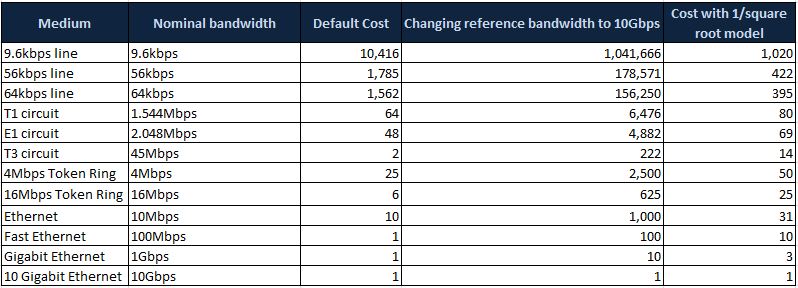
Default OSPF cost by interface bandwidth — note the 100 Mbps reference-bandwidth tie at cost 1.
From study charts · jdepew88 CCNA notes
Inter-area route notation
When reading show ip route ospf on multi-area labs:
| Code | Meaning |
|---|---|
| O | Intra-area route (same area) |
| O IA | Inter-area route (via ABR) |
| O E2 | External Type 2 (from ASBR / redistribution) |
| O*IA | Candidate default inter-area route (often from stub area) |
Area 0 is the backbone. An ABR has at least one interface in Area 0 and one in another area. An ASBR injects external routes into OSPF (redistribution).
Stub and totally stubby areas (CCNA awareness)
Stub area — external routes (O E2) are replaced with a default inter-area route (O*IA). The stub flag must match on all routers in the area or adjacency breaks until both sides agree.
router ospf 1
 area 15 stub
Totally stubby area — removes external and inter-area routes, leaving intra-area routes plus a single default. On the ABR advertising the default:
area 15 stub no-summary
| Area type | Routing table contains |
|---|---|
| Normal | O, O IA, O E2 |
| Stub | O, O IA, O*IA (default replaces external) |
| Totally stubby | O, O*IA (default replaces external + inter-area) |
Area 0 cannot be a stub area.
Default-information originate (CCNA awareness)
Instead of redistributing many connected routes, an edge router with Internet access can advertise a default route into OSPF:
router ospf 1
 default-information originate
The router must have a default route to advertise unless you use default-information originate always (lab caution — can advertise a default even without one).
Virtual links (CCNA awareness only)
If a non-backbone area loses direct connection to Area 0, a virtual link can extend the backbone through a transit area. Configuration uses Router IDs, not interface IPs:
area 34 virtual-link 3.3.3.3
Know the concept for exam awareness — CCNA labs rarely build virtual links. Common failures: wrong RID, stub transit area, or missing authentication match.
Troubleshooting
| Issue | First checks |
|---|---|
| No neighbor | Same subnet? Area match? Hello/dead timers? Passive interface? ACL blocking proto 89? |
| Stuck INIT | One-way Hellos — multicast/ACL, or neighbor does not see your RID |
| Stuck 2-WAY | Normal for DROTHERs; problem if DR/BDR should be FULL |
| Stuck EXSTART/EXCHANGE | MTU mismatch on the link |
| No OSPF routes | network/ip ospf covers interface? Passive interface? |
| Suboptimal path | Reference bandwidth, manual cost, or missing link in topology |
show ip ospf neighbor
show ip ospf neighbor detail
show ip ospf interface
show ip ospf border-routers
show ip route ospf
debug ip ospf adj
show ip ospf neighbor is always the first command — no FULL, no synchronized LSDB.
Exam checklist
DR/BDR election happens on multi-access segments only. Point-to-point serial links skip election entirely.
Configuring stub on one router without the other drops adjacency until both sides have the same stub setting.
With default reference bandwidth, 100 Mbps through 100 Gbps interfaces all show cost 1 — adjust auto-cost reference-bandwidth in modern labs.
Quick review
- States: Down → Init → 2-Way → ExStart → Exchange → Loading → Full
- DR/BDR on broadcast/NBMA; DROTHERs FULL with DR/BDR, 2-Way with each other
- Hellos: 224.0.0.5; DR traffic: 224.0.0.6
- Cost = reference BW ÷ link BW; change reference BW domain-wide
- O / O IA / O E2 / O*IA — know the codes on
show ip route ospf - Stub areas replace external routes with a default; totally stubby removes inter-area too