Overview
Open Shortest Path First (OSPF) is the primary CCNA link-state IGP. Unlike distance-vector protocols that periodically advertise whole routing tables, OSPF routers exchange link-state advertisements (LSAs) bundled in link-state updates (LSUs), build a shared link-state database (LSDB), and run Shortest Path First (SPF / Dijkstra) locally to choose best paths.
This guide covers OSPF mechanics and single-area configuration. For neighbor states, DR/BDR, cost tuning, and multi-area design, continue to OSPF Neighbors, DR/BDR, Cost, and Areas. For IPv6, see OSPFv3 for IPv6.
Link-state vs distance vector
| Behavior | Distance vector (RIP) | Link state (OSPF) |
|---|---|---|
| What is exchanged | Full/partial route tables to neighbors | LSAs describing local links |
| Topology view | Next-hop rumor from neighbors | Full area topology in the LSDB |
| Convergence | Periodic updates; loops possible during change | SPF recalculates quickly on change |
| Metric | Hop count | Cost (bandwidth-based) |
Link = router interface. Link state = description of that interface and its relationship to neighbors. All link states in an area form the LSDB — the input to SPF.
LSAs, LSUs, LSDB, and SPF
- Routers discover neighbors with Hello packets (covered in detail on the neighbors guide).
- After adjacency, routers exchange DBD, LSR, and LSU packets to synchronize the LSDB.
- Each router runs SPF (Dijkstra) against the LSDB to populate the routing table.
OSPF does not periodically flood entire routing tables like RIP. After the initial exchange, updates are event-driven (topology change), with LSAs refreshed on a 30-minute timer in production networks.
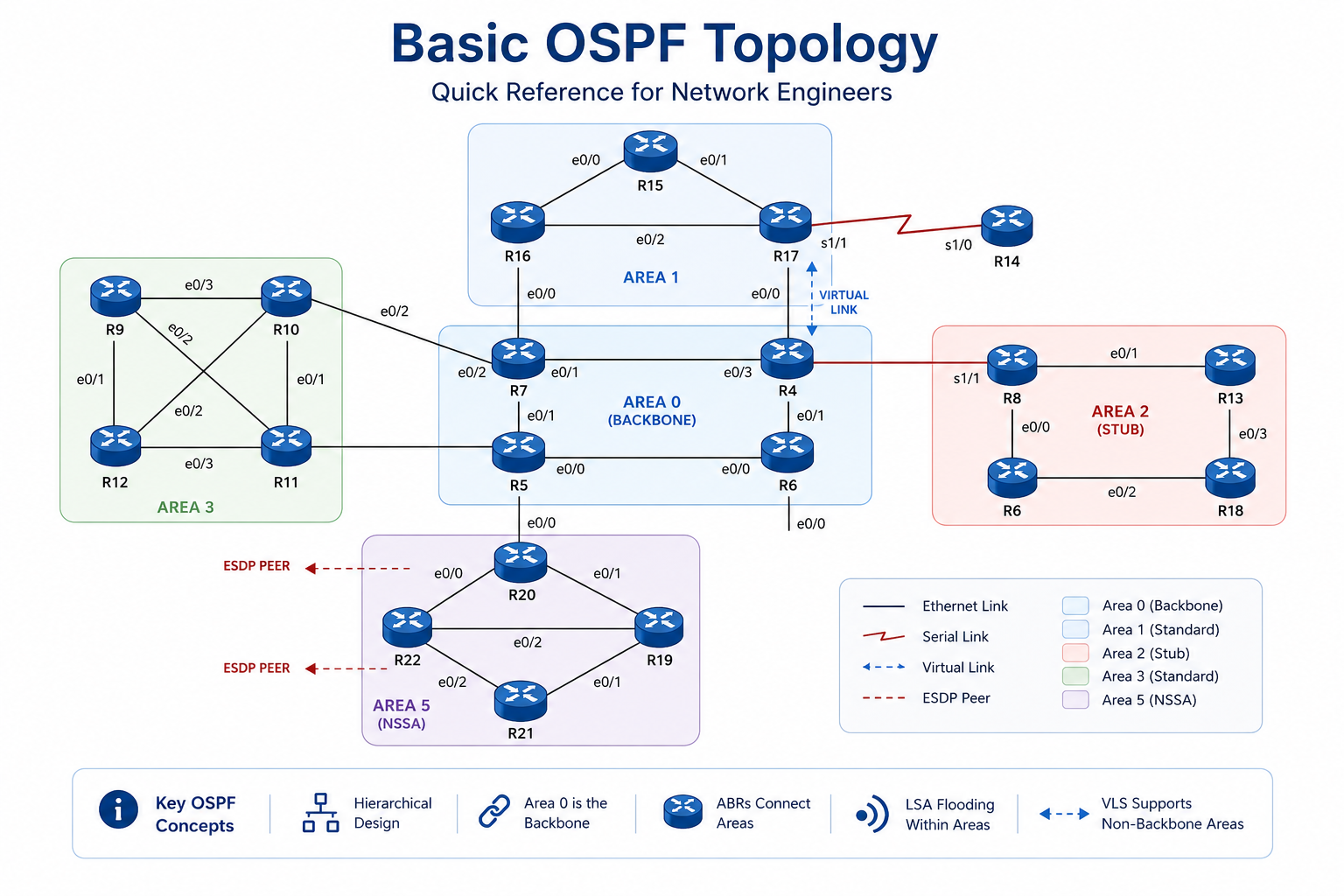
Simple OSPF topology — each router builds the same area LSDB, then runs SPF independently.
From study charts · jdepew88 CCNA notes
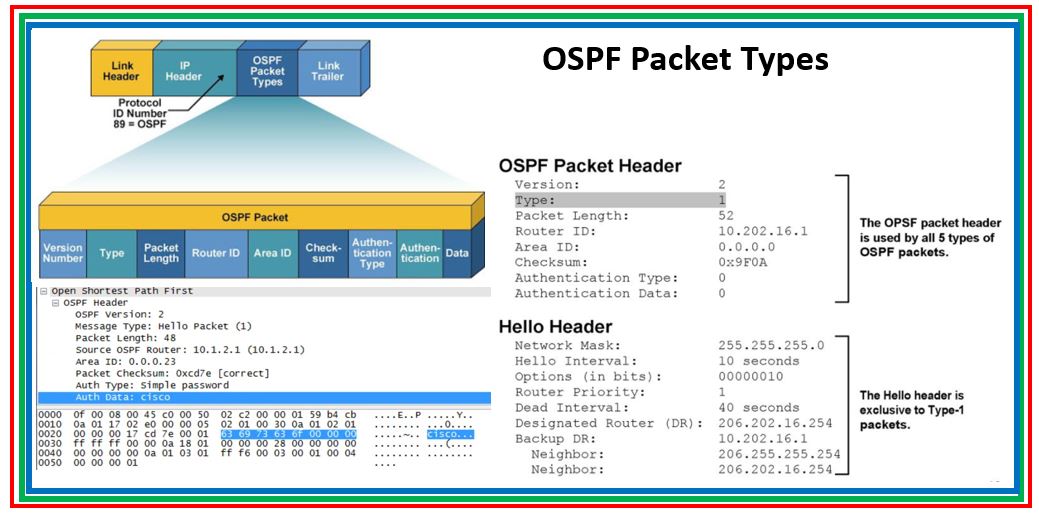
OSPF 24-byte common header — every OSPF packet shares this structure.
From study charts · jdepew88 CCNA notes
OSPF packet types
| Type | Name | Purpose |
|---|---|---|
| 1 | Hello | Discover/maintain neighbors; carry timer, area, auth, and stub flags |
| 2 | DBD (Database Description) | Summary of LSAs in the local LSDB |
| 3 | LSR (Link State Request) | Request full details for missing LSAs |
| 4 | LSU (Link State Update) | Carries one or more LSAs |
| 5 | LSAck | Acknowledges received LSUs |
Hello and dead timers
Hello packets are the heartbeat of OSPF. Hello and dead intervals must match between neighbors on the same segment.
| Network type | Hello (default) | Dead (default) |
|---|---|---|
| Broadcast / Point-to-Point | 10 sec | 40 sec |
| NBMA / Point-to-Multipoint | 30 sec | 120 sec |
Dead interval is normally 4 × hello. When you change hello on an interface, IOS typically adjusts dead automatically.
Hellos are sent to 224.0.0.5 (All OSPF routers). OSPF uses IP protocol 89 — not TCP or UDP.
Router ID and process ID
Router ID (RID): 32-bit dotted-decimal identity for the router in OSPF.
Selection order when OSPF starts:
- Manually configured
router-id - Highest loopback IP address (if any)
- Highest active physical interface IP
Best practice: set a loopback or manual RID so an interface flap does not change OSPF identity. After changing RID, run clear ip ospf process or reload the router.
Process ID: 1–65535, locally significant only — it does not need to match neighbors. It lets you run multiple OSPF processes on one router (uncommon at CCNA).
Enabling OSPF: network statement vs interface
Classic single-area config uses a wildcard mask in the network statement:
router ospf 1
router-id 1.1.1.1
network 10.0.0.0 0.255.255.255 area 0
OSPF network uses a wildcard mask, not a subnet mask. network 192.168.1.0 0.0.0.255 area 0 enables OSPF on interfaces in 192.168.1.0/24.
Modern interface-level config is explicit and common in labs:
interface GigabitEthernet0/0
 ip address 10.1.1.1 255.255.255.0
 ip ospf 1 area 0
Both approaches can coexist — pick one style per lab for clarity. Area 0 is the OSPF backbone; CCNA single-area labs place every router in Area 0.
LSA types (CCNA awareness)
| Type | Name | Generated by |
|---|---|---|
| 1 | Router LSA | Every router — links in the area |
| 2 | Network LSA | DR on multi-access segments |
| 3 | Summary LSA | ABR — routes between areas |
| 4 | ASBR Summary | ABR — path to ASBR |
| 5 | External LSA | ASBR — routes from outside OSPF |
Single-area CCNA labs focus on Type 1 and Type 2. Inter-area and external types appear when you read show ip route ospf on multi-area topologies — see the neighbors and design guide.
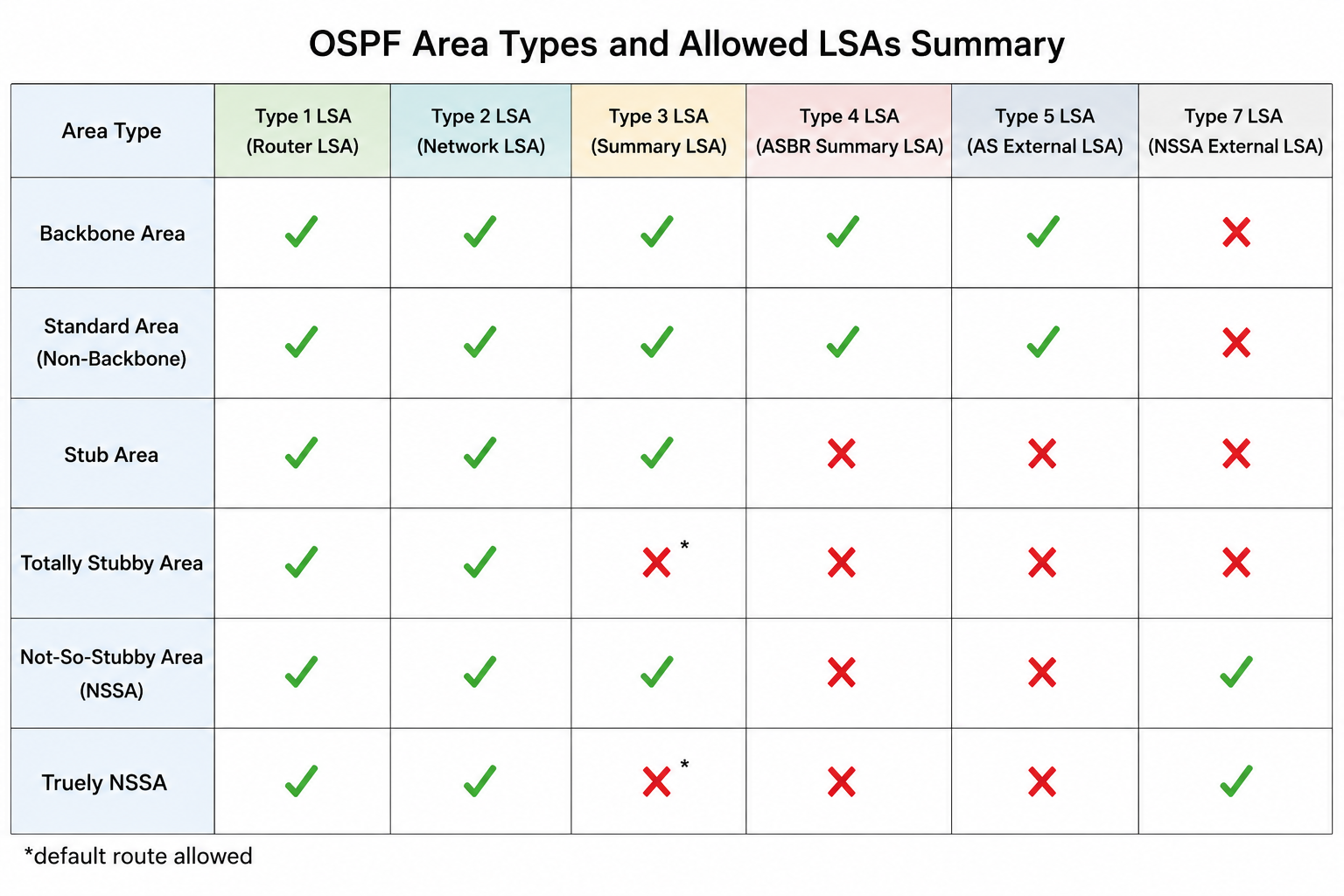
LSA types by area role — awareness for reading the OSPF database.
From study charts · jdepew88 CCNA notes
Core verification commands
For a lab submission workflow with grouped show commands and an x-remote YAML playbook, see OSPF CLI Verification.
show ip ospf
show ip ospf interface brief
show ip ospf interface
show ip ospf database
show ip ospf neighbor
show ip route ospf
show ip protocols
| Command | What it tells you |
|---|---|
show ip ospf neighbor | Adjacency state — target FULL for synchronized LSDB |
show ip ospf database | LSDB contents for the area |
show ip protocols | Process ID, RID, networks, and passive interfaces |
show ip route ospf | Routes learned via OSPF |
Exam checklist
OSPF is link-state: LSAs → LSDB → SPF → routing table. It does not behave like RIP's periodic full-table updates.
Process numbers are locally significant. Hello/dead timers, area ID, and subnet must match — process ID does not.
Even in "single-area" OSPF, that area is Area 0. Multi-area designs require inter-area traffic to transit the backbone — covered on the neighbors and design guide.
Quick review
- OSPF floods LSAs/LSUs, builds an LSDB, and runs SPF — not periodic full routing tables
- Protocol 89; Hellos to 224.0.0.5
- Hello/dead must match; broadcast default 10/40
- Process ID is local; Router ID must be unique
- Enable with
network … area 0orip ospf 1 area 0 - Verify with
show ip ospf neighborandshow ip route ospf